Poke Genie -Remote Raid IV PvP
- 4.7
- Rating
- 10.00M
- Installs
- Free
- Price

 Analysis by App-foxy
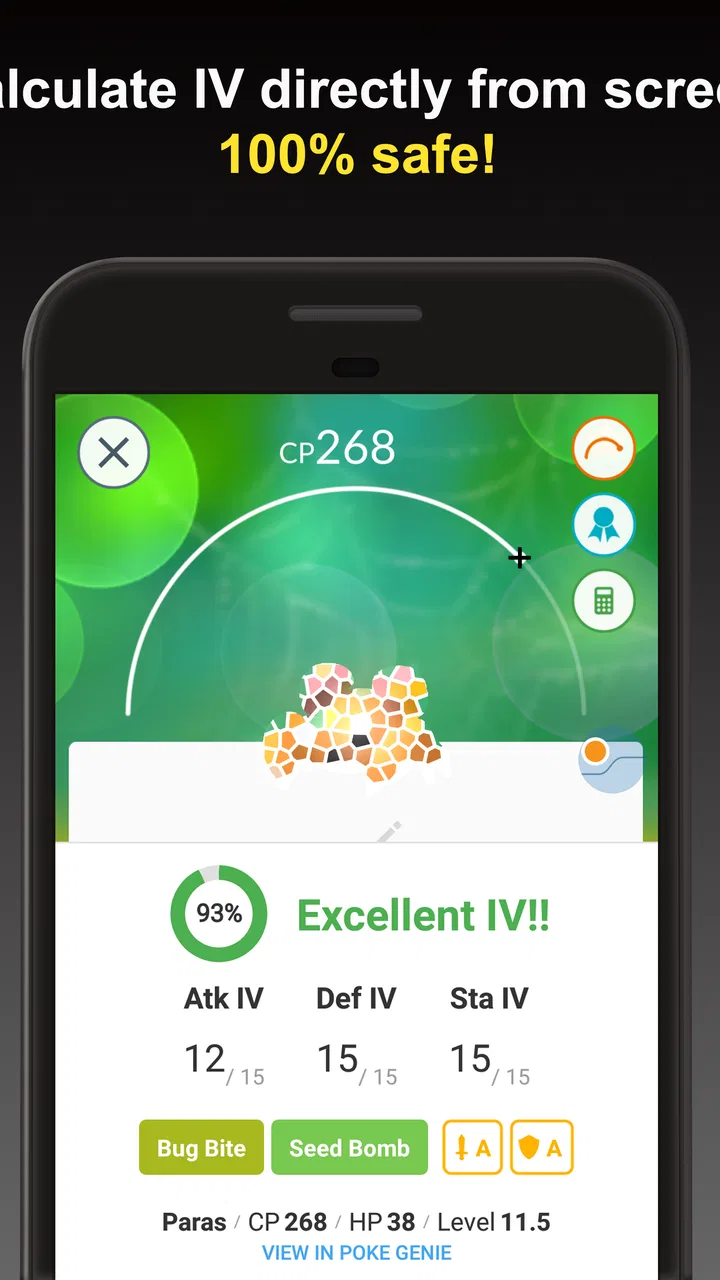
When I want to make more informed choices in Pokémon GO, I use Poke Genie as a companion rather than as a replacement for the game itself. It brings several practical tools into one place, including IV checking, PvP evaluation, remote raid support, naming help, and Pokédex information. That combination makes it especially useful when the game is moving quickly and I do not want to stop and calculate everything manually.
My experience with it has been strongest when I treat it as a decision-making aid. It helps answer questions such as whether a newly caught Pokémon is worth keeping, which candidates deserve attention for player-versus-player battles, and how to organize a collection before it becomes difficult to manage. It is a free tools app from Poke Genie, rated for Everyone, and it has become a familiar choice for trainers who want more detail than Pokémon GO presents on its own.
How the app feels to read and navigate
The main strength of the interface is that its purpose is easy to understand. The tools are organized around recognizable Pokémon GO tasks instead of hiding everything behind a complicated technical dashboard. I can move from checking a Pokémon to considering its battle value without needing to learn a completely different workflow each time.
You May Also Like

 Blood Strike: 2.5 Anniversary
Blood Strike’s Loadouts Turn Every Drop Into a Tactical Gamble
A close look at Blood Strike’s custom loadouts: how fast access to signature weapons reshapes its battle royale rhythm, rewards preparation, and narrows the gap between fights.

 Pandora - Music & Podcasts
Pandora’s Music Is Easy to Start, but Harder to Recover
Pandora’s strength is its low-effort path from a seed to a station. Its weak spot is how much confidence it asks you to place in connection, setup, and quiet recovery.

 8 Ball Pool
 Is Built on Rivalries, Rematches, and Routine
A close look at the rivalries, rematches, shared routines, and unanswered safety questions that turn a quick pool match into a persistent mobile community.

 Samsung Music
’s Quiet Strength Is Playing What You Already Own
Its reach comes less from spectacle than from dependable access to a personal library. That simplicity is both the app’s strongest retention engine and its ceiling.

 AccuWeather: Weather Radar
AccuWeather Review: A Quick, Clear Forecast for Everyday Decisions
For everyday plans, the best forecast is the one you can understand quickly. AccuWeather makes rain timing, radar, and local conditions easy to act on, with a few trade-offs.

 Hill Climb Racing
Why Hill Climb Racing Still Turns Crashes Into One More Run
A tiny car, a bumpy hill and one more upgrade: Hill Climb Racing keeps resurfacing because its simple chaos makes every near-miss feel personal.
More From Our News Desk



That matters for readability. Pokémon GO already presents a lot of information through small labels, icons, menus, and changing screens. Poke Genie adds another layer, so a clear route through the app is important. In normal use, I found the individual tools easier to approach when I focused on one job at a time: evaluate a Pokémon, inspect its result, then return to the collection or raid-related function I actually needed.
The app is not simply a Pokédex with a few extra buttons. Its useful information is connected to decisions. A result is most helpful when I use it to decide what to transfer, what to evolve, what to power up, or what to save for a particular battle format. That makes the layout feel practical rather than decorative.
New users should expect a short adjustment period, especially if they have never worked with IVs or PvP rankings. The words may be familiar to experienced players but less obvious to someone who only knows the basic capture-and-battle loop. I would not call that a serious flaw, but I do recommend opening one tool at a time and learning what each result means before trying to optimize an entire collection.
Reading results without getting lost in the numbers
The most important accessibility question here is not only whether information is visible, but whether it is understandable. Poke Genie can surface more detail than Pokémon GO, which is valuable for careful players but can also feel like a lot when several Pokémon are being checked in succession.
I get better results when I use a simple routine. First, I identify the Pokémon and its basic evaluation. Next, I decide whether I care about raids, general use, or PvP. Finally, I record or act on the result immediately. This prevents a long list of nearly identical candidates from becoming confusing.
The naming tool is particularly useful in that routine. Instead of remembering every result myself, I can use a consistent naming approach so the important information remains visible later in the Pokémon GO storage screen. That is more than a convenience for collectors; it reduces the need to repeatedly reopen the companion app and repeat the same inspection.
For players who find dense screens tiring, the best approach is to avoid treating every available detail as mandatory. The app offers value even when I use only the parts that answer my current question. A trainer who wants a quick keep-or-transfer decision can use it differently from someone building a carefully ranked PvP roster.
Motor effort, visual demand, and sensory comfort
Poke Genie can reduce mental effort, but it does not remove all physical interaction. Depending on the task, I still need to switch between Pokémon GO and the companion app, select the right Pokémon, inspect information, and sometimes return to the game to rename or manage it. That repeated movement can feel tedious during a long sorting session.
For me, the most comfortable workflow is short and deliberate. I check a small group, act on the results, and take a break instead of trying to process an entire storage box in one sitting. This is also less error-prone. When I rush through repeated screens, I am more likely to confuse one Pokémon with another or forget why I marked a candidate as useful.
Visual attention is another consideration. IV and PvP decisions involve comparing multiple pieces of information, and the difference between a generally strong Pokémon and a specialized candidate may not be obvious at a glance. Players with reduced vision, color sensitivity, or difficulty distinguishing small interface elements may need to enlarge the surrounding display or use device-level accessibility settings where available. I would not assume that every result is equally easy to interpret for every reader.
Sound is not central to the app’s value. The important work is visual and text-based, which is helpful for people who prefer silent use or cannot rely on audio cues. At the same time, that means a user who needs information presented in a different format may find the experience less comfortable than someone who reads screens easily.
Motor accessibility also depends on the phone and the Pokémon GO workflow. If switching applications, tapping small controls, or performing repeated selections is difficult, the app may be most useful for occasional checks rather than continuous sorting. I appreciate that the tools can save decision-making time, but the physical steps between the two apps remain part of the experience.
Useful in real situations, not just for collection theory
A realistic example is a busy raid day. I may catch several Pokémon, have limited time before joining another activity, and want to know which ones deserve attention. Instead of trying to remember every appraisal or judging each catch by instinct, I can use Poke Genie to review them in a consistent order. The practical benefit is not that it makes every decision for me; it helps me spend my limited attention on the candidates that matter.
Remote raid support is another situation where the app’s role becomes clearer. A player who regularly joins raids from home or while traveling may value a dedicated companion workflow more than someone who only raids with nearby friends. The feature set is aimed at trainers who want to connect raid-related planning with the rest of their Pokémon GO routine, although the usefulness naturally depends on how often that person participates in remote raids.
For PvP, I find the app most helpful when I begin with a goal. “Find the best Pokémon” is too vague because a candidate can be excellent for one league or role and uninteresting for another. I prefer to decide which battle context I care about, then use the evaluation to narrow the field. This avoids a common mistake: transferring a Pokémon that looks ordinary in a general appraisal but has value in a more specialized battle situation.
That is one of the app’s less obvious strengths. It encourages me to separate collection value from battle value. A Pokémon does not need to be impressive in every category to deserve a place in storage. Poke Genie is useful precisely because it can help expose those less obvious cases before I make an irreversible decision.
Workflows that save time
My favorite workflow is a three-stage pass. I start with newly caught Pokémon, use the IV tool to remove obvious low-priority entries, and then inspect the remaining candidates for PvP relevance. After that, I use naming support so the result stays useful inside Pokémon GO. This is faster and clearer than repeatedly reopening the same Pokémon later.
A second useful habit is to use the app before spending valuable resources. Powering up or evolving a Pokémon can feel satisfying, but it is frustrating to discover later that another candidate would have suited the intended purpose better. A quick check in Poke Genie gives me a reason to pause before committing resources.
The third insight is that the app works best as a filter, not as an authority that replaces judgment. Rankings and evaluations can guide a shortlist, but I still consider whether I actually enjoy using a Pokémon, whether I need a particular type of team member, and whether I am preparing for a real battle rather than chasing an abstract perfect result. This keeps the tool from turning the game into a spreadsheet.
The Pokédex component also has a different role from the IV tools. It is useful when I need a reference while planning, but it does not automatically make every collection decision easier. I use it to fill knowledge gaps, then return to the more immediate task. Keeping those purposes separate makes the app feel less crowded.
Who benefits most from it?
I would recommend Poke Genie to players who enjoy improving their storage, preparing for PvP, joining remote raids, or making more careful use of limited in-game resources. It is especially suitable for trainers who have reached the point where Pokémon GO’s built-in appraisal is no longer detailed enough for their decisions.
It is also a good fit for people who prefer one companion app instead of several specialized utilities. The combination of IV analysis, PvP guidance, naming support, raid-related tools, and Pokédex reference means I do not need to build a separate routine around each question.
On the other hand, a casual player who catches Pokémon only occasionally may find the extra information unnecessary. If I am playing mainly for exploration, collecting, or relaxed battles, I may not want to inspect every candidate. In that case, the app can add friction rather than enjoyment.
It is also not the right choice for someone who dislikes switching between apps or who wants a completely hands-off answer. The value comes from interacting with the results and applying them to the way I play. Players who prefer a simple in-game experience may be happier using Pokémon GO’s own tools and accepting less detail.
Free access and optional spending
The app is free to use, which makes it easy to try without committing money first. Optional in-app purchases range from $2.99 to $47.99 per item. I would approach those purchases carefully because the free experience is enough to judge whether the workflow actually suits me.
The right question is not whether more tools sound useful, but whether I will use them often enough to reduce real effort. A frequent raider or competitive PvP player may see more value in expanded convenience than a trainer who opens the app only after an unusually good catch. I would spend only after using the basic workflow across several ordinary play sessions.
There is also a time cost to consider. Even a free tool can become expensive in attention if it encourages me to inspect every Pokémon, compare every ranking, and postpone playing. I get the best balance when I use it at specific decision points rather than making it a permanent second screen.
Compatibility, maturity, and practical expectations
Poke Genie was released on July 19, 2017, and the current version is 8.17.0. It supports Android 6.0 and later. Those details matter for anyone using an older phone, particularly if Pokémon GO itself already places a heavy demand on the device.
The app has reached more than ten million installs, with an average rating of 4.7 from around 525 thousand ratings and about 40 thousand written reviews. That level of adoption suggests that it is not a niche experiment, but popularity should not be confused with universal comfort. The best test is still whether its screens and switching workflow fit the way I use my phone.
I also appreciate that its age means the concept is easy to understand: it has been built around Pokémon GO players who want deeper information than the main game provides. Still, any companion tool adds a layer between intention and action. Before relying on it during a time-sensitive raid or a large cleanup session, I would practice the steps when there is no pressure.
Barriers that remain
The biggest remaining barrier is complexity. Poke Genie gathers many useful functions, but that breadth can make the app feel demanding for newcomers. The more advanced the goal, the more carefully I need to interpret the results instead of accepting a single number as the whole story.
Another barrier is context switching. A user may need to look at Pokémon GO, move to Poke Genie, understand the evaluation, and then return to the game to take action. That is manageable for occasional use, but it can become tiring for people with limited dexterity, attention fatigue, or difficulty keeping track of multiple screens.
There is also a risk of over-optimization. The app can make a hobby feel more like administration if I let every catch become a research task. I think it is important to decide in advance what deserves analysis. For example, I might inspect Pokémon intended for PvP or high-cost upgrades while leaving ordinary captures alone.
Finally, the app cannot decide what kind of player I want to be. It can help compare candidates and organize information, but it cannot tell me whether a technically weaker Pokémon is more enjoyable to use, whether a raid is worth my time, or whether a perfect collection matters to me. That human judgment remains essential.
My inclusive verdict
I see Poke Genie as a strong companion for Pokémon GO players who want clearer decisions without assembling several separate tools. Its biggest success is turning complicated collection and battle questions into manageable checks. The naming workflow, the separation between IV and PvP thinking, and the ability to use raid and Pokédex-related tools in the same app give it practical value beyond a basic appraisal helper.
From an inclusive-use perspective, it supports different play styles reasonably well because I can use only the tools that match my needs. Silent, text-based use is helpful, and the ability to process a few Pokémon at a time makes the experience easier to adapt. However, the interface still asks users to read detailed information, tap repeatedly, and move between apps. People with visual, motor, or attention-related needs may need device settings, shorter sessions, or a more selective workflow.
My recommendation is to use it as a focused assistant, not as a requirement for playing well. Try the free version, choose one task such as checking PvP candidates or organizing names, and see whether it genuinely reduces effort. If it helps you make confident decisions, it earns a place in your routine. If it makes every capture feel like paperwork, Pokémon GO’s simpler built-in approach may be the better fit.
For my own play, the app is most valuable at the moments when a quick decision has lasting consequences: before transferring a borderline Pokémon, before investing resources, or before building a team for a specific purpose. Used that way, Poke Genie adds useful depth while leaving the actual enjoyment of Pokémon GO in my hands.
FAQs for Poke Genie -Remote Raid IV PvP
01What is Poke Genie, and what can I use it for?
Poke Genie is a companion app for Pokémon GO that helps you evaluate Pokémon, calculate battle statistics, and prepare for different gameplay situations. Its tools can estimate individual values, analyze movesets, compare PvP performance, and provide raid-related assistance. It is designed to support your decisions while playing, rather than replace the official Pokémon GO app or play the game independently.
02How does Poke Genie help with Pokémon IV and PvP analysis?
The app can analyze a Pokémon’s attack, defense, and stamina values to estimate its IVs and show how suitable it may be for different leagues or battle formats. It also provides useful comparisons and rankings for PvP-focused players. Results should be treated as guidance, since recommendations can change when Pokémon GO updates moves, balance, battle mechanics, or introduces new formats.
03Can Poke Genie help me join remote raids?
Poke Genie includes features intended to help players participate in remote raids by connecting hosts and guests through its raid matchmaking system. You generally select a raid, follow the instructions for joining or hosting, and use Pokémon GO to complete the actual battle. Remote Raid Passes, in-game limits, availability, and any current Pokémon GO restrictions still apply.
04Is Poke Genie safe to use with my Pokémon GO account?
Poke Genie is generally used as an external companion rather than as an automated gameplay tool. It can provide overlays, scanning assistance, calculators, and raid coordination depending on the device and enabled features. However, users should avoid anything that automates actions, spoofs location, or violates Niantic’s rules. Review requested permissions carefully, use official app stores, and never share your Pokémon GO password.
05Is Poke Genie free, and are there advertisements or paid features?
Poke Genie can be downloaded and used with many core tools available at no cost, but the experience may include advertisements, optional purchases, or premium features depending on the platform and current version. Some advanced analysis, convenience functions, or reduced-ad options may require payment. Before downloading, check the latest Google Play or App Store listing for pricing, subscriptions, and supported features.
Pros
- Accurate IV scanning helps evaluate Pokémon quickly.
- Useful PvP rankings support smarter team-building decisions.
- Raid counters make preparing for difficult bosses easier.
- Overlay tools reduce the need to switch between apps.
- Supports both casual collectors and competitive players.
Cons
- Some advanced features require a premium subscription.
- Overlay permissions may feel intrusive on certain devices.
- Scan results can be affected by unclear screenshots.
- Raid coordination depends on an active player community.
- Frequent game updates may temporarily disrupt some tools.

Poke Genie -Remote Raid IV PvP
Gallery